


Hisense Channels
3.33.00 Reviews
App Specs
- Version
- 2.0.5
- Updated On
- License
- Free
- Downloads
- 1,000,000+
- Developer
- V America Operations Inc.
- Categories
- Entertainment
- Platform
- Android
Screenshots
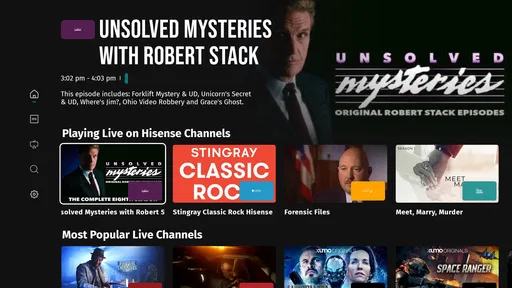
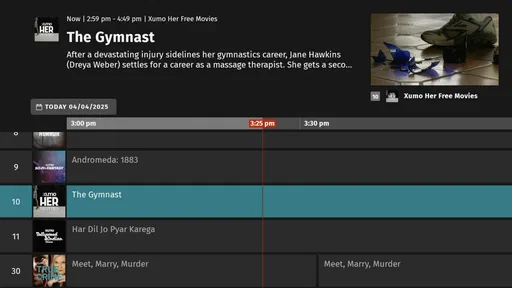
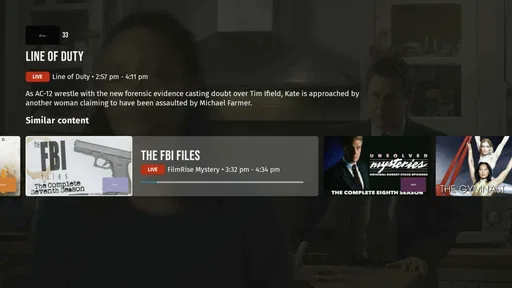
 Analysis by AppCompare
I tend to judge an entertainment app less by the first evening than by whether I still have a reason to open it a few weeks later. Hisense Channels is aimed at people who want television-style viewing in an app, with live and on-demand programming in one place. That can make it a handy option when I want something to watch without planning a whole evening around a particular show. Its appeal, though, depends on whether its available programming matches my habits; a neat starting point is not automatically a lasting replacement for the services I already use.
The first-week appeal: quick viewing without much setup
For a first try, the proposition is easy to understand: open the app, look around, and see whether something catches your eye. It is free, which makes sampling it a low-commitment decision, and V America Operations Inc. is the developer behind it. The app is in the entertainment category, carries a Teen age rating, and its current version is 2.0.5. Those details help set expectations, but they do not tell me whether I will keep it installed; that comes down to what I actually find when I browse.
A realistic use case is the gap between finishing dinner and deciding what to do next. I might open a live channel for background viewing while tidying up, then switch to on-demand programming if I want to pay closer attention. That kind of casual, low-planning session is where a combined live-and-on-demand service can be more convenient than opening several separate apps and searching for a specific title. It is less compelling when I already know exactly what I want and that programme belongs to a subscription service I use regularly.
The first week is also the best time to test the app against your own routine rather than browse endlessly. Try it at the time you would normally turn on the television, search for a few subjects you genuinely enjoy, and see whether you can settle on something without a long hunt. A useful test is not simply whether the catalogue looks broad, but whether you can find a programme you would actually choose on an ordinary evening. If browsing itself becomes the activity, the novelty may be doing more work than the content.
Month-to-month value depends on repeat viewing
Hisense Channels has reached over one million installs, and its average rating is 3.3 from around 59 ratings. I take that as a reason to approach it with curiosity rather than assume it will suit everyone. The rating is neither a guarantee of quality nor a verdict on my particular use. I would give the app a fair trial by checking whether it earns a place in a weekly routine: for example, as a quick source of live viewing on weekdays or a fallback when I do not want to choose a film in advance.
There is a practical difference between having many things to browse and having a dependable reason to return. For a household with varied tastes, the live-and-on-demand mix may help fill small viewing gaps without requiring everyone to agree on one planned title. For someone who watches only a few carefully chosen series, a service built around those specific shows may offer better value in time, even if it costs money. The right comparison is not simply free versus paid; it is whether this app regularly gives you something you would otherwise spend time looking for.
I would also keep expectations grounded when comparing it with familiar alternatives. A paid subscription service is often the more natural choice when I want a particular exclusive show or a carefully maintained personal queue. A video platform is useful when I want creator-led clips or a specific online video. Hisense Channels makes more sense as a television-like option for browsing and dipping in, rather than as a universal home for every kind of viewing. Those alternatives are not interchangeable, and choosing among them depends on whether I value planned, on-demand selection or the ease of turning on something live.
Worth Reading Before You Choose

EA SPORTS FC Mobile 26 Is a Bigger Football Game, but It Takes Time

Flipboard Shows What News Apps Must Do Beyond the Feed

Switching to Android Auto Means Rethinking Your Driving Routine

Google Calendar Makes a Crowded Week Easier to Manage

Ludo King Makes the Most of the Minutes Between Plans

Baby Panda World Brings Quick Play to Modern Phones, but Its Game Library Feels Busy
Maintenance: keep the app, not a second viewing job
The app is most useful if it does not create extra work. I would avoid treating every recommendation as a task to investigate or trying to remember everything I have seen. Instead, use a short trial period to notice which types of programmes lead to an enjoyable session, and return to those areas when you have limited time. This small habit makes browsing more purposeful and reveals whether the service has repeat value for you.
If several people share a screen or device, agree on a simple way to handle viewing choices. One person’s browsing can otherwise shape what appears relevant to another, making recommendations less helpful in a shared household. I would check whether the app’s available controls suit the way the household uses it before relying on personalization. Likewise, parents should treat the Teen rating and any available viewing restrictions as prompts to review settings and supervise age-appropriate use, not as a substitute for making their own decisions about what children can watch.
Connectivity is another everyday consideration. Streaming depends on a stable internet connection, so if a programme pauses or looks less clear, I would first compare performance at another time or in another location before concluding that the catalogue or app itself is the problem. This is a useful way to separate a temporary network issue from a service that consistently fails to fit your routine. It also matters if you expect to watch while travelling or away from your usual connection: the app is a better match for people who can stream comfortably than for anyone who needs a dependable offline library.
Where viewing fatigue can creep in
The main risk with a browsing-first service is choice fatigue. Live viewing can be relaxing when I want to let something play, but it is not always the best route to a particular programme. On-demand viewing can solve that problem only if the titles I want are actually available and easy to locate. If I repeatedly open the app, scroll for a while, and leave without watching, that is a stronger sign of poor fit than a single quiet evening.
Another possible source of fatigue is splitting attention across too many services. A free app can seem harmless to keep, but it still takes space on a device and asks for a place in my viewing routine. I would keep it if it fills a distinct role—such as casual live television when I do not want to choose a specific title—and remove it from my regular rotation if it only duplicates services I already use. The test is simple: after the initial curiosity wears off, does it save me effort or give me a kind of viewing I would miss?
It is also worth matching the device and viewing style to the job. This app is described as Hisense Channels, but I would not assume that the name alone guarantees the same experience on every screen or that it behaves exactly like a traditional television service. Before making it the centre of a household setup, try the device you plan to use most and make sure navigation and playback feel comfortable from that position. A few minutes of testing on the intended screen can prevent the disappointment of building a habit around an experience that works better in theory than in your living room.
Getting Started with Hisense Channels
First off, setting up Hisense Channels is a breeze. Once you download it from the App Store or Google Play, the installation is quick and straightforward. No tech wizardry needed here. As soon as you open the app, you’re greeted with a clean and intuitive interface that feels quite welcoming. It’s like meeting someone who’s friendly and easy to get along with right off the bat.
Interface and User Experience
The design of the app is sleek and modern, which is a huge plus in my book. It doesn’t feel cluttered, and navigating through the menus is pretty seamless. You can easily find what you’re looking for without having to dig through endless tabs and lists. The search functionality is particularly robust, making it simple to find your desired content with just a few taps.
One thing I really appreciate is the personalized recommendations. It’s like having a friend who knows exactly what you’re in the mood for. The app uses your viewing history to suggest content, which I found to be quite accurate and helpful. It’s a little touch that makes the experience feel tailored to you.
Content Library
Now, onto the heart of the app: the content. Hisense Channels boasts a diverse range of shows and movies. Whether you’re into action-packed thrillers, feel-good comedies, or documentaries that spark your curiosity, there’s something here for everyone. The library is updated regularly, so you never run into the dreaded “nothing to watch” scenario.
The streaming quality is top-notch. I didn’t experience any buffering issues, even during peak times. The video plays smoothly, and the resolution is crisp, provided you have a decent internet connection. It’s always a bummer when an app promises high-quality streams and doesn’t deliver, but that’s not the case here.
Additional Features
Let’s talk about some of the cool features that make Hisense Channels stand out. One nifty feature is the ability to create multiple profiles. This is super handy if you’re sharing your account with family or roommates. Each person can have their own watchlist and recommendations, which keeps things organized and personalized.
I also found the parental controls to be quite robust. You can set restrictions based on content ratings, ensuring that little ones don’t stumble upon anything they shouldn’t be watching. It’s peace of mind for parents, which is always a win.
Final Thoughts
Overall, Hisense Channels is a solid choice for anyone looking to enhance their streaming experience. The app combines a user-friendly interface with a vast content library and personalized features that make it a joy to use. It’s not just another streaming app; it feels like a thoughtfully crafted service that keeps the user in mind.
If you’re on the hunt for a new app to satisfy your binge-watching needs, give Hisense Channels a try. Whether you’re a casual viewer or a hardcore streamer, this app is bound to have something that’ll keep you entertained for hours. So, grab your popcorn, get comfy, and let the streaming marathon begin!
Pros
- User-friendly interface enhances navigation.
- Wide range of content options available.
- Seamless integration with smart devices.
- Customizable viewing preferences.
- Regular updates improve performance.
Cons
- Limited offline content availability.
- Occasional buffering on slower networks.
- Ads can interrupt the viewing experience.
- Some features require a subscription.
- Not all content is available in HD.
FAQs for Hisense Channels
What is Hisense Channels and how does it work?
Hisense Channels is a streaming app that aggregates content from various sources, offering users a seamless viewing experience. It provides access to movies, TV shows, and live channels, all in one place. The app's intuitive interface allows users to easily browse and select their preferred content, creating a personalized entertainment hub.
Is Hisense Channels available for both Android and iOS devices?
Yes, Hisense Channels is available for both Android and iOS devices. Users can download the app from the Google Play Store for Android or the Apple App Store for iOS. This cross-platform availability ensures a wide range of users can access and enjoy the content provided by Hisense Channels.
Does Hisense Channels require a subscription or is it free to use?
Hisense Channels offers both free and subscription-based content. While some content is available at no cost, accessing premium content or certain features may require a subscription. Users can explore the available options within the app to decide if they want to upgrade for additional benefits.
What are the main features of Hisense Channels?
Hisense Channels boasts several key features, including a vast library of content, user-friendly navigation, personalized recommendations, and live TV streaming. Additionally, it offers high-definition streaming, ensuring a quality viewing experience. The app's robust search functionality helps users quickly find specific titles or genres they are interested in.
Are there any notable pros and cons of using Hisense Channels?
The pros of Hisense Channels include its comprehensive content library, ease of use, and the ability to consolidate multiple streaming sources in one app. However, some users may find the need for a subscription to access premium content a drawback. Additionally, the app's performance might vary depending on the device and internet connection quality.


